The Master Guide to Mixing Red and Green: Color Formulas, Ratios, and Uses
 By Sarah Jenkins
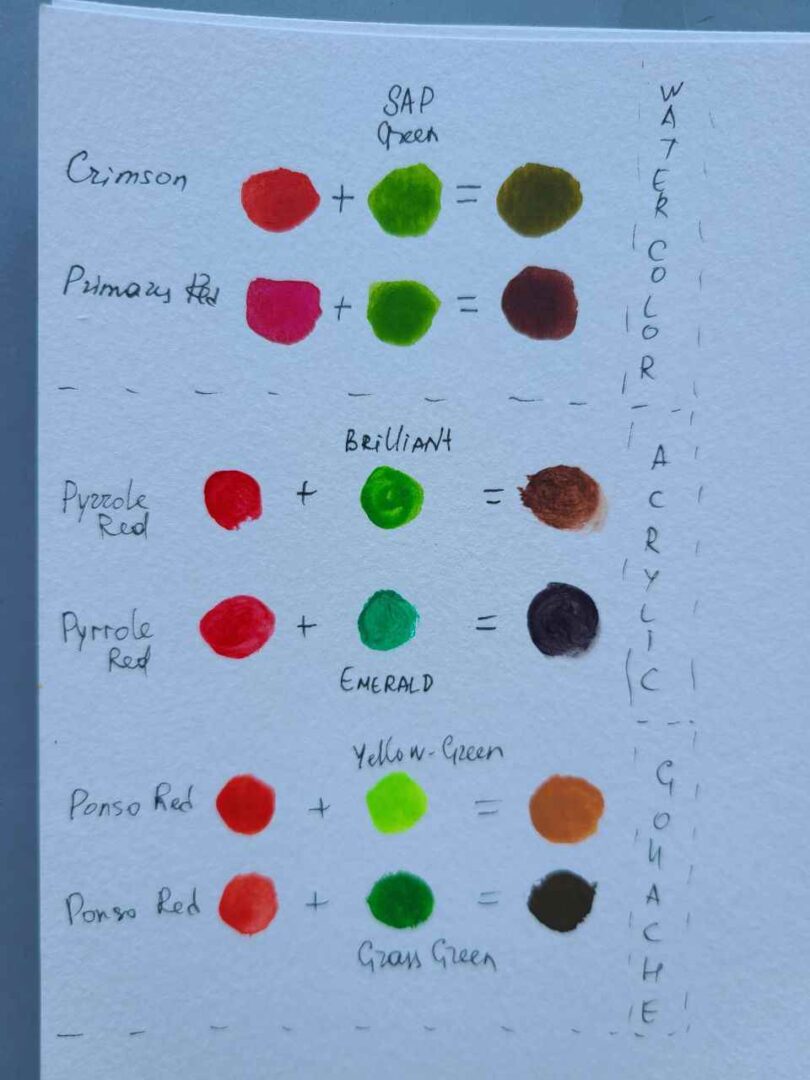
Q1: Why do red and green make brown in paint but yellow on a computer screen?
A1: Paint uses subtractive mixing, where pigments absorb light wavelengths and reflect only what is left over. Blending red and green absorbs almost all visible light, leaving a dark, neutralized brown. Screens use additive mixing, firing separate red and green light rays that stimulate the eye's cones at the same time, prompting the brain to perceive pure yellow.
Q2: How do I mix red and green to make black instead of brown?
A2: Use transparent, cool pigments with intense tinting power. Combine Alizarin Crimson (PR83) or Quinacridone Crimson with Phthalo Green (PG7) in a precise 1:1 balance. This creates a deep chromatic black that offers far more atmospheric depth than flat carbon or ivory tube blacks.
Q3: Which red-green mixture works best for realistic olive skin tones?
A3: Blend Venetian Red or Light Red (inorganic iron oxides) with a hint of Terre Verte (PG23) or muted Sap Green, then adjust the value with Titanium White. The natural earthy base prevents the skin tones from reading as either sickly green or unnaturally sunburned.
Q4: Why does my red-green mixture look chalky?
A4: Chalkiness occurs when you introduce opaque whites (such as zinc or titanium white) too early, or when you use budget student-grade paints stuffed with chalk fillers like calcium carbonate. Keep your red and green mixtures strictly transparent until the base value is correct, and only then add tiny amounts of opaque white to adjust tint.
Sarah Jenkins is a veteran tech journalist with over 12 years of experience covering artificial intelligence, mobile innovations, and digital ethics. Her insights have appeared in leading technology publications worldwide.
