How to Use Creator Search Insights in 2026: the Complete Step-by-Step Growth Guide
 By Sophia Al-Mansoor
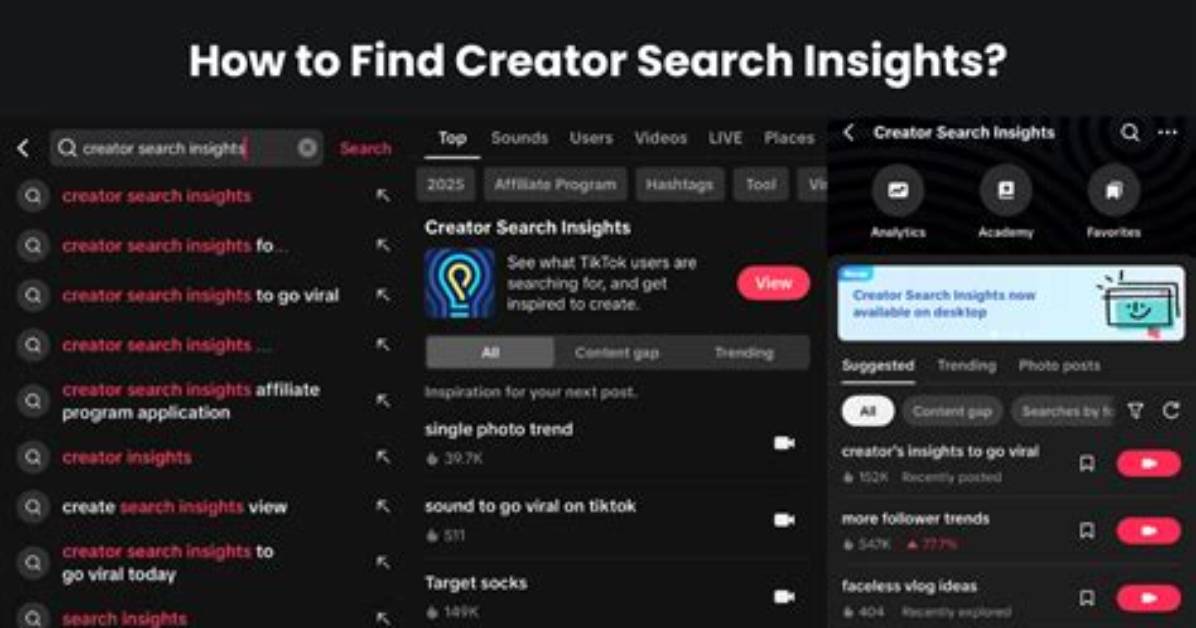
Accessing these metrics requires looking beyond basic engagement rates. Inside the mobile application, typing "Creator Search Insights" into the search bar or locating it within the creator tools menu exposes raw consumer intent. The dashboard organizes opportunities into two primary feeds: general trending search topics across the platform and topics tailored directly to your specific account niche.
Each term receives an explicit popularity score ranging from baseline interest to breakout volume. When monitoring these lists, pay close attention to velocity indicators. A topic displaying a steep upward trajectory over a rolling 7-day window indicates an emerging cultural moment before broader saturation hits the feed.
Creators frequently make the mistake of filtering solely for raw search volume metrics. Massive queries like "fitness tips" or "easy dinner" carry millions of searches, but they also face millions of competing clips. Instead, drill into multi-word queries. Long-tail phrases reveal distinct consumer pain points. A phrase like "high protein meal prep for shift workers" carries immediate contextual relevance, making conversion rates and full-watch percentages significantly higher.
Sophia analyzes international trade, startup ecosystems, retail transformation, and supply chain logistics for modern digital publications.
